 Reckoner
Guides
How to play
The guides from the game in one place: how every part of Reckoner works, step by step, with screenshots from the game itself.
These are the guides from the game. The same
30 topics live in the app under Settings, Guides, with the same keyword search. Tap a topic to
open it; the numbered marks on each screenshot match the list under it. Getting started
The basic loop
Reckoner is about the balance of every trip: what a hunt earns against what it burns.
 12
12
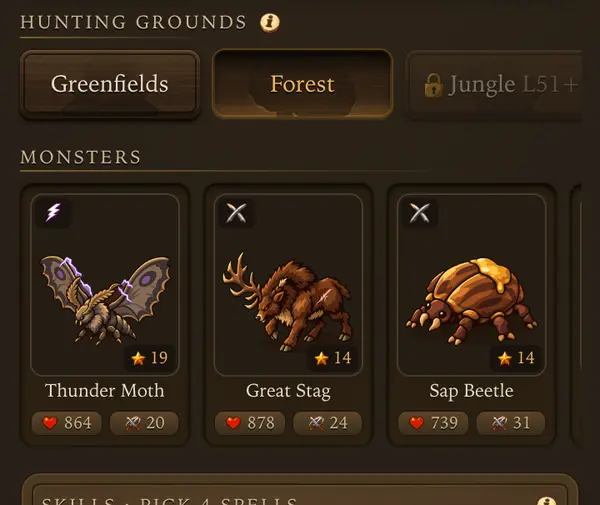
- 1Pick a hunting ground. New ones open with your level.
- 2Tap a monster to open its hunt card.
One trip, start to finish
- Open Adventure, Hunt. Pick a land and a monster you can survive.
- Buy supplies in Town, Shop: health potions, mana potions and food. A paladin also needs bolts.
- Tap Rotation under the skill slots and set when your character heals.
- Set Hunt for on the monster card and tap Hunt here.
- The hunt runs on its own, also with the app closed. Come back when it ends.
- Read the return report, sell the loot you do not need, wear upgrades, restock and go again.
What makes a good hunt
- You come back alive with more gold than the supplies cost. Exp follows.
- Net gold in the Journal tells you whether a spot pays. A negative Net means the spot is too hard or the supplies too expensive.
- Better armor means fewer potions per hour, so upgrades pay for themselves.
First steps
- The First steps card on the Hunt screen walks you through the loop. Its gold is paid once per class on an account.
- Rewards are claimed in town, not while the character is out.
Tips
- A longer hunt is not always a richer one: weight and bag squares decide how much loot comes home.
- Up to level 20 you can set out as often as you like.
- New screens open as you level up. A lock shows the level it opens at.
Every number behind it: Overview
Nothing here matches that.
 Hunting
Choosing a hunt
Pick a spot by what your character can survive and what it pays.
12
- 1Pick a hunting ground. New ones open with your level.
- 2Tap a monster to open its hunt card.
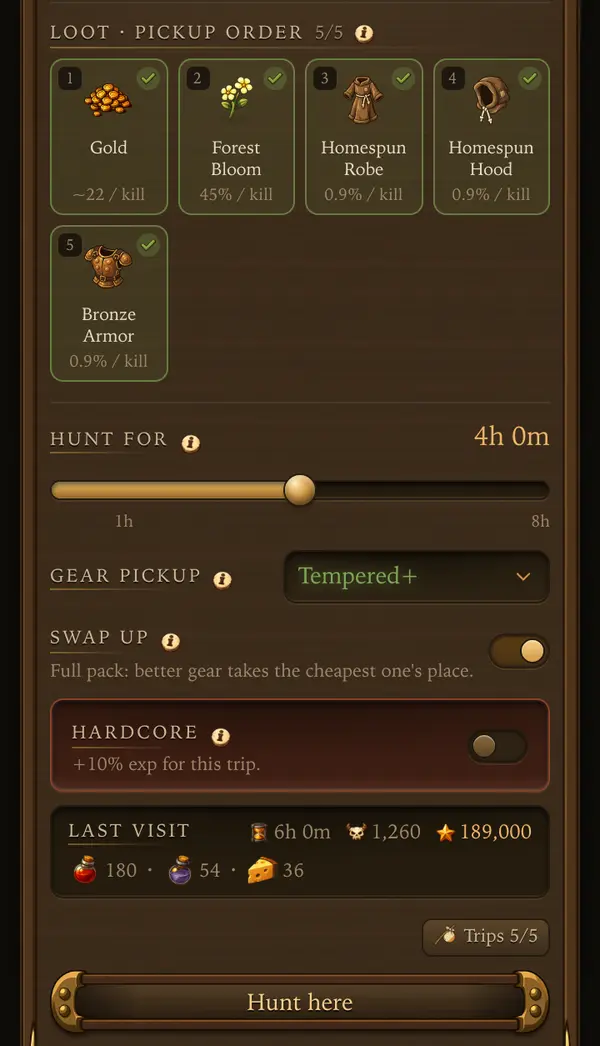 12345
12345
- 1Loot: what drops, in the order the bag picks it up.
- 2Hunt for: how many hours the trip lasts.
- 3Gear pickup: the lowest rarity of gear worth bringing home.
- 4Hardcore: more exp, but a death costs a lot.
- 5Hunt here: set out.
Finding a spot
- Hunting grounds is the row of lands on Adventure, Hunt. A locked land shows the level it opens at.
- Monsters lists the monsters of the chosen land. A tile shows exp, health and how hard the monster hits you after your armor.
The monster card
- Tap a monster to open its card: HP, hit (damage range and hits per second), crit, exp, average gold and its spells.
- Element chips: a plus means the monster takes more damage from that element, a minus means it resists it.
- Loot, pickup order lists what drops and how often. Tap the circle to leave an item behind and drag to change the order. When the bag fills up, items at the top win.
- Last visit shows your previous trip to that monster: hours, kills, exp and supplies burned.
Hunt for
- Set the trip length from 1 to 8 hours, then tap Hunt here.
- The trip ends when the time is up or on death. Running out of supplies does not end it, it only makes it riskier.
- After your first trip the card also offers Gear pickup (the lowest rarity of gear worth picking up) and Swap up (a better piece replaces the cheapest one in a full bag).
Trips
- Up to level 20 trips are unlimited.
- From then on you have 5 trips, and one comes back every 12 minutes. Long hunts use the bucket best.
Tips
- If a monster eats more potions than it pays, step down one monster or upgrade your armor.
- Hit a weakness: a monster weak to your element dies faster and costs less mana per kill.
- On weekends one monster of your land shows a Weekend Bonus with extra exp for trips that start before its timer ends.
Every number behind it: Bestiary and loot
Supplies and backpack
Your character takes only what is in the bag. Nothing is restocked out there.
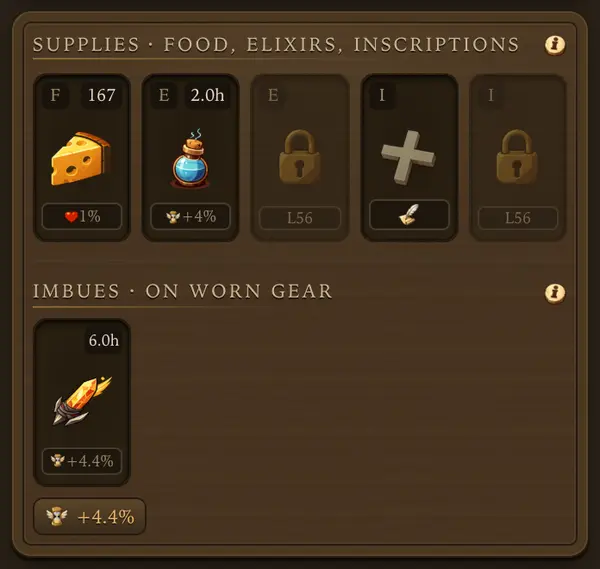 123
123
- 1Food: heals a little, all the time.
- 2Elixir: a buff that lasts hours of hunting.
- 3A locked slot opens at the level shown.
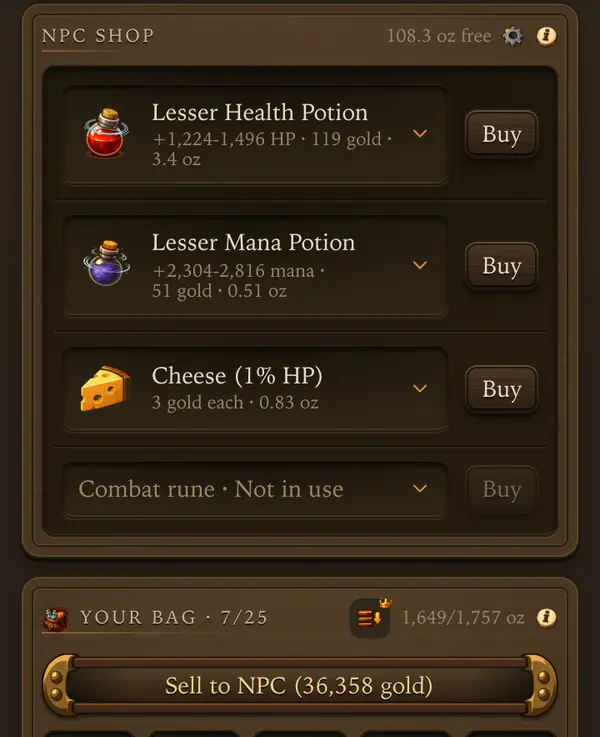 1234
1234
- 1Buy potions, food and runes here.
- 2Free weight left in the bag.
- 3Sell all loot to the NPC in one tap.
- 4Bag weight: used and max.
What to pack
- Health potions heal on a shared cooldown. A stronger potion heals more, not more often.
- Mana potions refill mana for spells and heals. Every class uses mana, knights too. Mana potions have their own cooldown.
- Food heals a small share of max health and mana over time. Better food comes from Cooking and the Market.
- Bolts are ammo for a paladin. Out of bolts, the paladin casts spells instead.
- Combat runes are attacks paid in gold. See the Combat runes guide.
- The bar on the Hunt scene counts your potions, food and bolts, in town too. Settings, Game, Supplies on the scene turns it off in town.
Elixirs and inscriptions
- The Supplies card on the Hunt screen has 2 elixir and 2 inscription slots.
- They last hours of hunting, not clock hours. Each tap adds one piece and extends the timer. Cancelling one loses the rest of its hours.
Weight and bag squares
- Two limits: weight in oz and bag squares (25 to start, a backpack adds more). Supplies use both, and loot fills what is left.
- When the bag is full, new loot stays in the field and is lost. The report lists it under Left in the field.
- Leave what the hunt does not need in the Depot before you set out.
Buying and selling back
- Buy in Town, Shop. The buy sheet shows the gold left and the oz free after the purchase.
- Unused potions, shop food, runes and bolts sell back at 70% of the price.
Tips
- Pack enough for the whole trip plus a margin, not the whole shop: every oz of potions is an oz of loot left behind.
- Supplies used in the return report tells you exactly what one trip needs.
- With premium, Restock buys back what the last trip used in one tap.
Every number behind it: Potions and supplies
Return and report
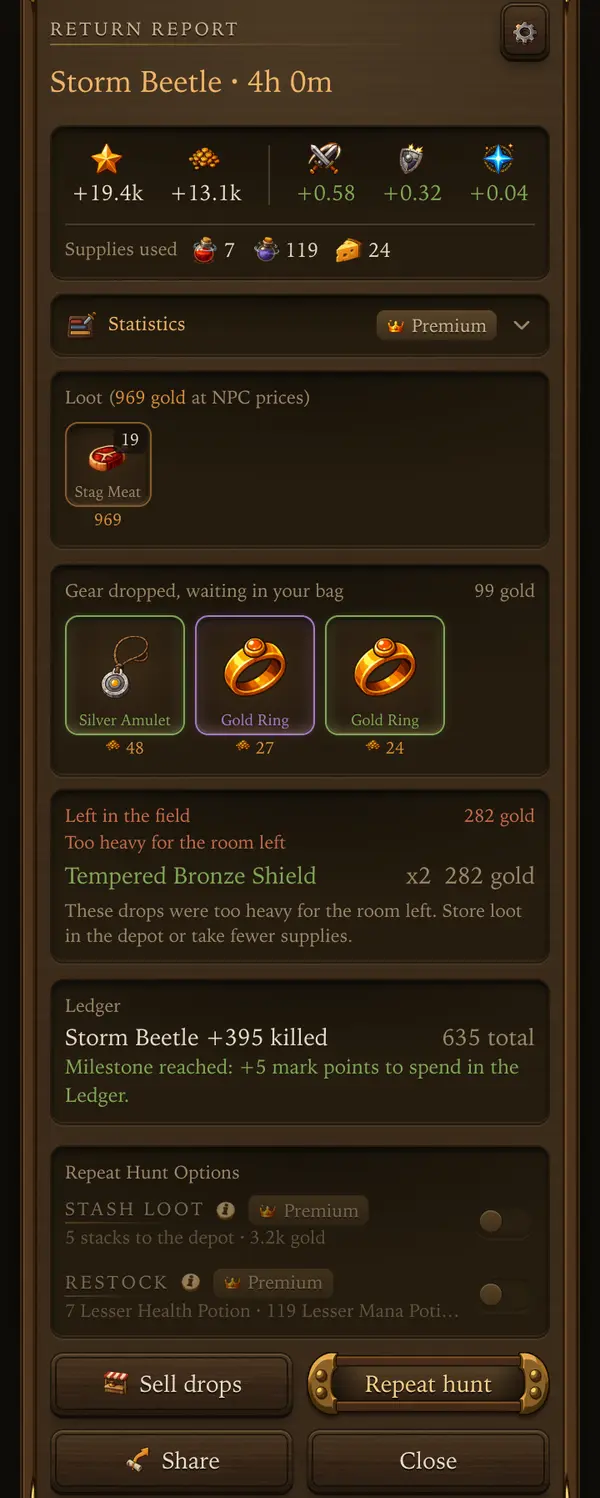
When a trip ends, the return report tells the whole story.
 1234
1234
- 1Supplies the trip burned.
- 2Gear that dropped. It waits in your bag.
- 3Sell that gear to the NPC.
- 4Set out on the same trip again.
Coming back
- The trip ends when Hunt for runs out or on death.
- End hunt on the live hunt card brings the character back early. Progress past that moment is lost.
- In the last seconds of a losing fight it is too late to pull out.
- When you open the app after time away, While you were away shows kills, exp and gold.
The report
- Return report shows exp, gold and skill gains, the supplies used, the loot with its value at NPC prices, gear that dropped and what was left in the field.
- An Ended line tells you why a trip stopped early.
- Ledger milestones reached on the trip show up here too.
After the report
- Sell drops sells only what this hunt dropped. You pick what leaves the bag.
- Repeat hunt sends the character back to the same monster with the same plan.
- Gear waits in the bag: wear it, put it in the depot, sell it to the NPC or list it on the Market.
- Crafting materials, imbue charges, gear above Common, imbued gear and supplies start unticked when selling, so a quick sale never takes them.
Tips
- A death ends the trip, but you keep what it earned. Hardcore is the exception.
- Gear dropped, waiting in your bag is worth checking every time: an upgrade there lowers the cost of every next hunt.
Hardcore and blessings
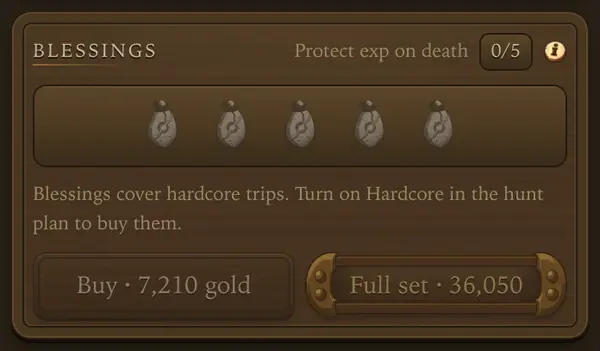
A riskier trip for more exp.
 12
12
- 1Buy one blessing.
- 2Buy the full set at once.
How it works
- From level 15, turn on Hardcore on the monster card before you set out. It counts for that one trip and gives +10% exp.
- On death you lose exp and some skill training.
- Without a full set of blessings you also lose the backpack: loot, unworn gear, potions, food, bolts, runes and the gold of the trip.
- Worn gear and the depot are always safe.
- Below level 26 a death never takes more than 3 levels.
Blessings
- Buy blessings in Town, Shop, up to 5. Each one cuts the loss, and a full set keeps the backpack.
- Blessings are spent only by a hardcore death.
Tips
- Go hardcore on a monster you already beat with room to spare. Check Last visit on its card first.
- Raise the heal and potion thresholds a little for a hardcore trip.
Nothing here matches that.
 Combat
Spells and skill slots
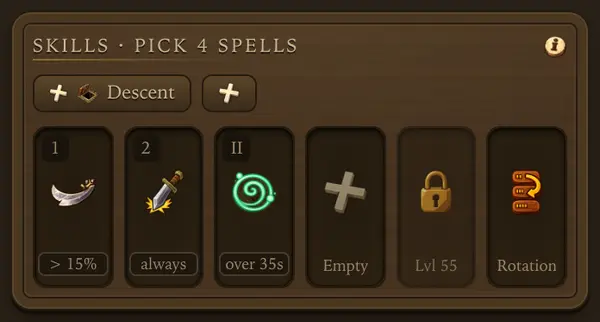
Attack spells, heals and runes share a few slots on the Hunt screen.
 1234
1234
- 1A spell in a slot. The line under it says when it fires.
- 2Empty slot: tap to put a spell, heal or rune in it.
- 3Rotation: order, conditions and when to heal.
- 4+ Descent saves these spells, potions and thresholds as your Descent set.
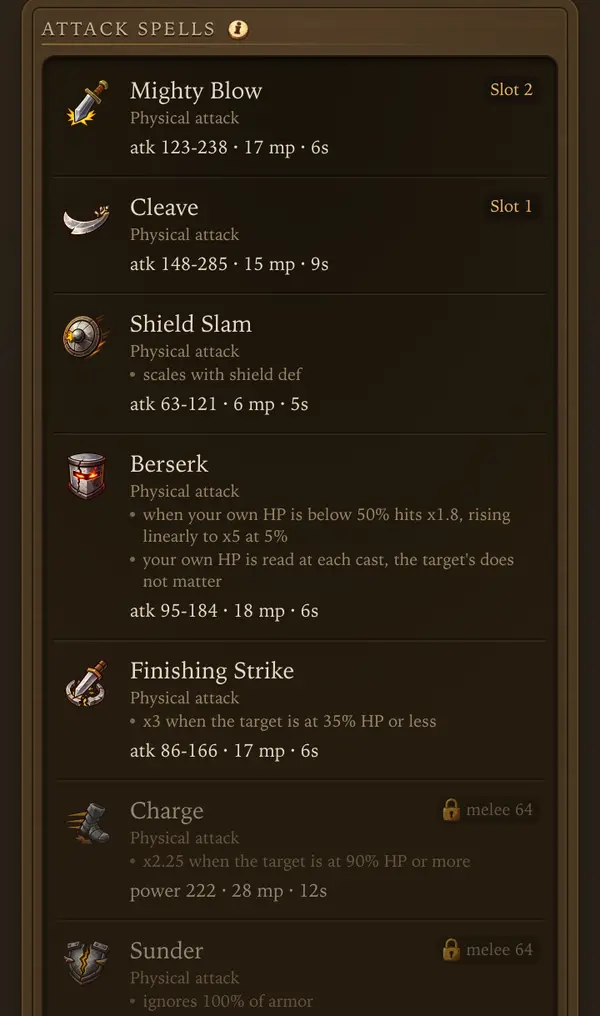 123
123
- 1Tap a spell to put it in a slot.
- 2The slot this spell sits in now.
- 3Locked: the skill it needs.
Spellbook
- Character, Spells lists your attack spells, healing spells and, for a knight, Regeneration.
- A locked spell shows what it needs: a skill level, a magic level (mlvl) or, for heals, a character level.
- Tap a spell to choose which slot it goes into. Whatever sat there steps aside.
Skill slots
- You start with 3 slots. Slot 4 opens at level 35, Slot 5 opens at level 55.
- A heal takes a slot an attack could use: pick what the spot needs.
- An empty slot means your weapon fills in.
Mana
- Attack spells and heals cost mana (mp on each spell). Bring mana potions for long hunts.
- A weapon from outside your class lowers spell damage. The spellbook shows it.
Presets
- The chips above the skill slots are presets: your spells, rotation, potions and thresholds. + saves what you use now. Tap a preset to load it.
- The icon next to a preset name opens its options: rename, overwrite or delete.
- + Descent saves a separate set for Descent runs. It does not count as one of your presets. Your hunt keeps its own spells.
- Pick which set a run uses in the Descent lobby, under Descent spells.
Tips
- Use the element the monster is weak to. The monster card shows its weaknesses.
- Order and conditions are set in Rotation. See the Rotation guide.
Every number behind it: Skills and spells
Rotation and healing
Rotation decides what your character casts and when it heals. Tap the Rotation tile at the end of the skill slots.
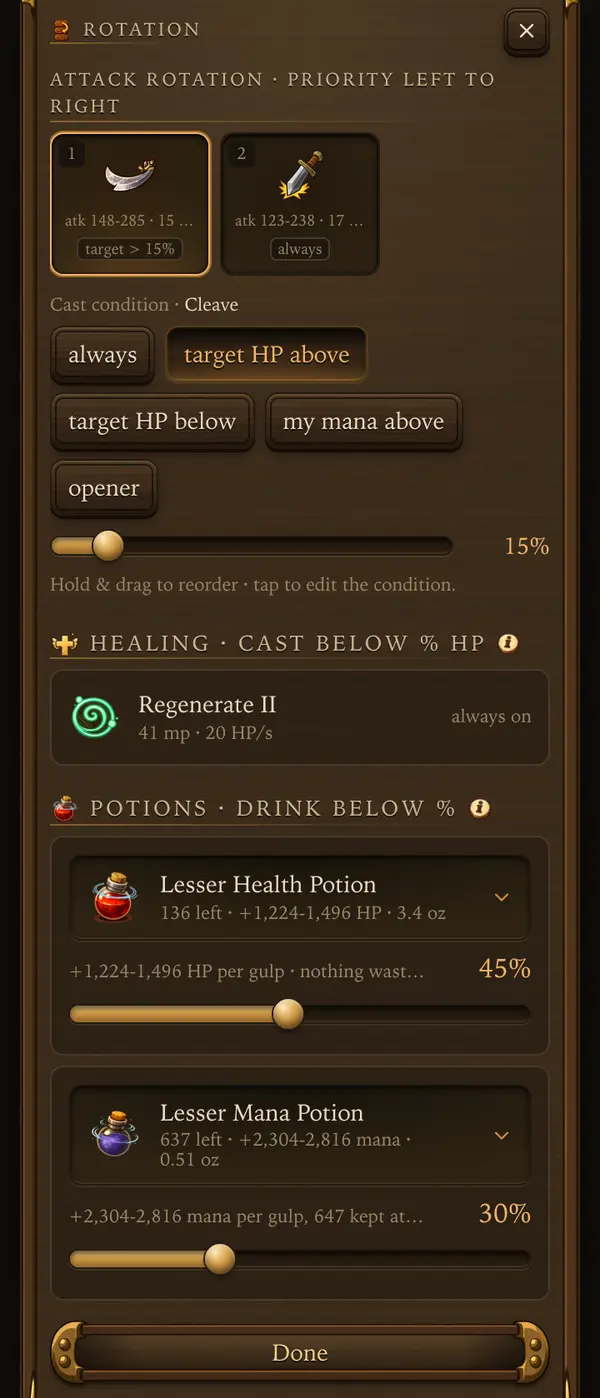 1234
1234
- 1Attack slots fire left to right. Hold and drag to reorder.
- 2When the selected spell fires.
- 3Your healing spell and when it casts.
- 4Potion slider: drink below this % of HP.
Attack order
- Attacks fire by priority, left to right. Hold and drag to change the order.
- Tap an attack to set when it fires: always, target HP above, target HP below, my mana above, or opener.
- Target HP below has a floor too, so the spell fires only between the two values.
Healing spells
- Each heal has its own cast below % HP slider. If two are met at once, the lower one wins.
- Regenerate (knight) is always on and has no slider.
Potions
- Drink below % sets when a potion is used. 0 turns it off. Health potions start at 45%.
- The heal spell goes first and the potion covers the rest.
Finding the right numbers
- Too high and part of every heal is wasted. Too low and a bad streak of hits can kill you.
- After a change, compare Supplies burned and deaths in the Journal.
Tips
- Use opener for your strongest spell on a fresh target and a cheap spell to finish it.
- My mana above keeps mana in reserve for heals.
- No healing spell picked means the character relies on potions and food alone.
Every number behind it: Skills and spells
Combat runes
Attacks you pay for with gold instead of mana.
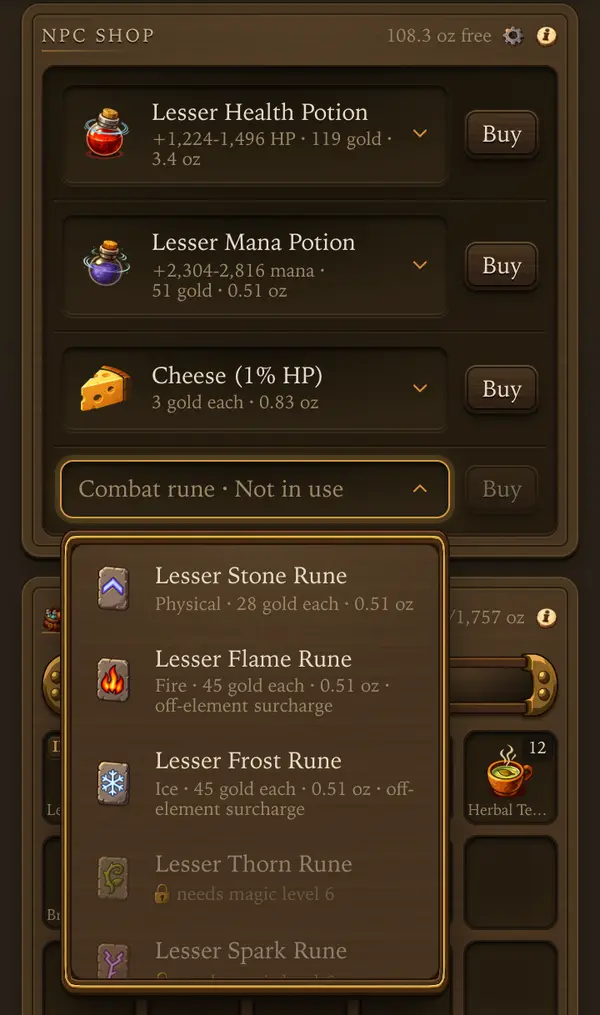 123
123
- 1The Combat rune shelf in Town, Shop. Tap it to pick a rune.
- 2Runes of your rank and magic level. Pick one, then Buy a stack.
- 3A locked rune says what magic level it needs.
How they work
- Every cast uses one rune from the bag. Runes cost gold, not mana.
- A rune finishes a monster below 30% health by default, so a hundred runes is about a hundred kills. Rotation can change when it fires.
- Runes share skill slots with spells. One kind of rune at a time.
Getting them
- Each rune element needs a magic level, and only the rank of your character level can be bought or taken on a hunt.
- Pick a rune on the supply shelf in Town, Shop, buy a stack, then put it in a skill slot on the Hunt screen.
- Your level sets the rune rank: you buy and carry only runes of your rank. Stronger ranks open at levels 14, 26, 56, 81, 106 and 131.
- Magic level unlocks each element. Runes outside your class elements cost more.
Tips
- Runes save mana for heals. They shine on monsters that take long to finish.
Every number behind it: Potions and supplies
Nothing here matches that.
 Records
Journal
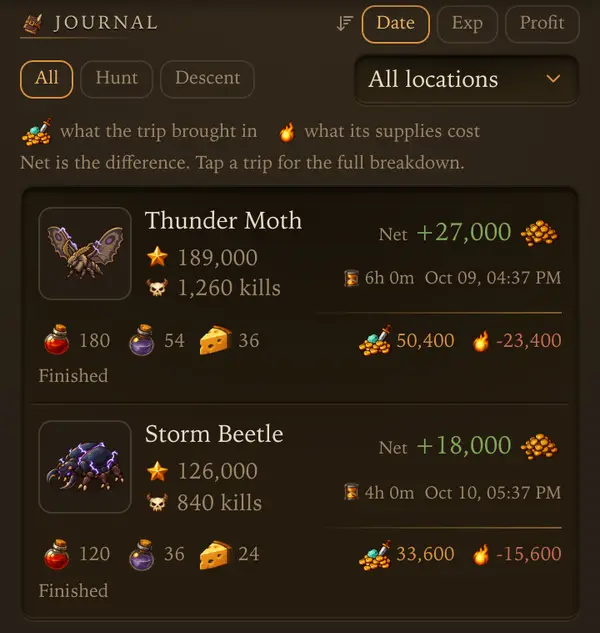
Every hunt and Descent run you made, with what it earned and what it cost.
 1234
1234
- 1Sort trips by date, exp or profit.
- 2Net: what the trip brought in minus its supplies.
- 3What the supplies cost.
- 4Tap a trip for the full breakdown.
Reading a trip
- Each tile shows exp, kills, Net gold, hours, the supplies burned and how the trip ended.
- Tap a tile for the full balance: Gold from kills, Loot at NPC prices, Supplies burned and Net.
Sorting and filters
- Sort by Date, Exp or Profit. Filter by Hunt or Descent and by land.
- Free accounts see the last 100 trips, premium up to 1000. The newest 50 keep full detail.
Spot averages
- With premium, Spot Averages at the top shows kills, exp and gold per hour for every spot you hunted, from your last 3 trips of 5 minutes or more.
Tips
- Sort by Profit to find your best paying spot, then by Exp to find your fastest.
- Repeat hunt inside a trip sends you back with the same plan.
Ledger and marks
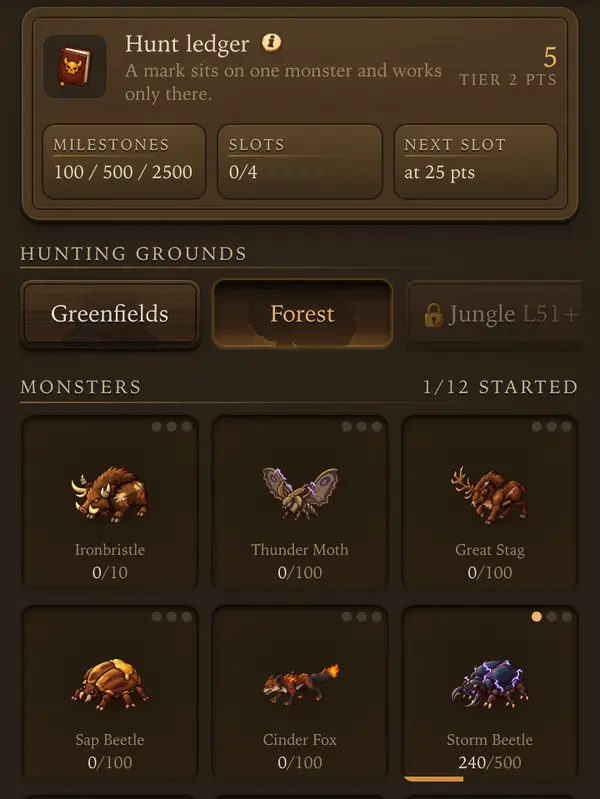
A kill book for every monster. Kills earn mark points, and marks boost hunting on the monsters you choose.
 123
123
- 1Milestones: kills on one monster that give mark points.
- 2Slots: marks you can place in this tier.
- 3A monster on its way to the next milestone.
Milestones
- Kill one monster 100, 500 and 2500 times to reach its milestones. Dungeon bosses need fewer kills.
- Each milestone gives 5 mark points.
- Hunts count every kill. In dungeons only bosses count.
Slots
- Points belong to the land that earned them.
- Slots open by themselves as points add up, up to 4 per land.
- Assign in Active slots, or Select monster on a monster, puts it into a free slot. That is free.
Marks
- A monster in a slot takes up to 3 marks. Each milestone reached unlocks stronger marks. A mark works only on that monster.
- First milestone: Spoils (more loot drops), Harvest (more crafting materials), Levy (coins worth more).
- Second: Lesson (more exp), Study (faster skill training), Toll (damage dealt returns as mana), Bulwark (less elemental damage taken).
- Third: Bane (harder hits), Weakpoint (more crits), Tank (more blocks).
Changing your mind
- Removing a mark costs gold. Change in Active slots puts another monster in the slot for more gold, and the old monster loses its marks.
- Marks cannot change while a hunt is running.
Tips
- Give slots to the monsters you hunt most: a mark pays on every kill there.
Every number behind it: Quests, marks, titles
Nothing here matches that.
 Character
Gear and rarity
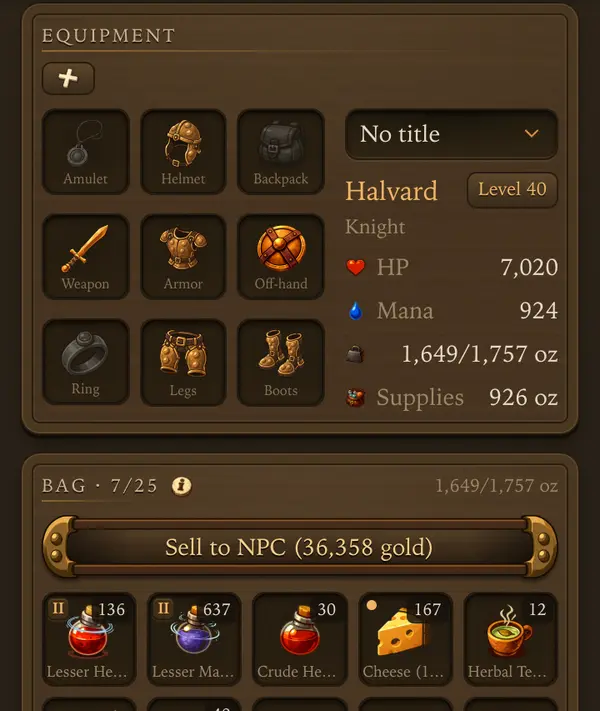
Gear decides how hard you hit and how much each hit costs you.
 123
123
- 1Tap a slot to change what is worn.
- 2Your stats with this gear.
- 3Sell all loot from the bag to the NPC.
Rarity
- From weakest to strongest: Common, Tempered (green), Ornate (blue), Flawless (purple), Ancient (red), Mythic (gold).
- Any piece can drop at any rarity. Higher rarity means higher stats and more room for enchants.
Levels
- L50 · Wearable L26 means a level 50 item you can wear from level 26.
- A piece you cannot wear yet shows the level it unlocks at.
Your class
- Knight: sword and shield, plate. Paladin: crossbow, plate. Mage: staff, robes. Druid: rod with a shield or a crystal, robes.
- Mage and paladin carry nothing in the off-hand.
- Gear of item level 76+ in a full 4/4 set gives +3.9% skill: robes raise magic level, plate raises melee and shielding for a knight and distance for a paladin.
Armor and defense
- Armor cuts a share of every hit, up to a cap, measured against the monster's level. It comes from helmet, armor, legs and boots.
- Defense is a chance to block a whole hit. It comes from the shield or weapon and the shielding skill.
Wearing gear
- Tap a piece in the bag, then Equip. Or tap a slot in Character, Gear to pick from everything you own.
- Character, Armory lists every piece in the game, its stats at each rarity and where it drops.
Tips
- Armor upgrades are the cheapest way to cut potion costs.
- Disenchant gear you will never wear: it gives dust for the Forge.
Every number behind it: Armory
Imbues
An imbue adds a stat to a worn piece for a number of hunting hours.
Putting one on
- Imbues come from sigils, made by Enchanting or bought on the Market.
- Tap the sigil in your bag and pick the piece. Sigils in the depot have to be withdrawn first.
- Only Flawless (purple) and better pieces take imbues.
How they run
- An imbue belongs to the item. It works and its hours run only while you wear it.
- Each further imbue of the same stat gives much less. Spread your stats.
- You can take an imbue off in town, on the gear card or in Crafting, Active imbues. Its remaining charge is lost.
Tips
- Imbues on gear you are not wearing do nothing and keep their hours.
Every number behind it: Rarity, forge, imbues
Outfits
Outfits change how your character looks. They never change a number in a fight.
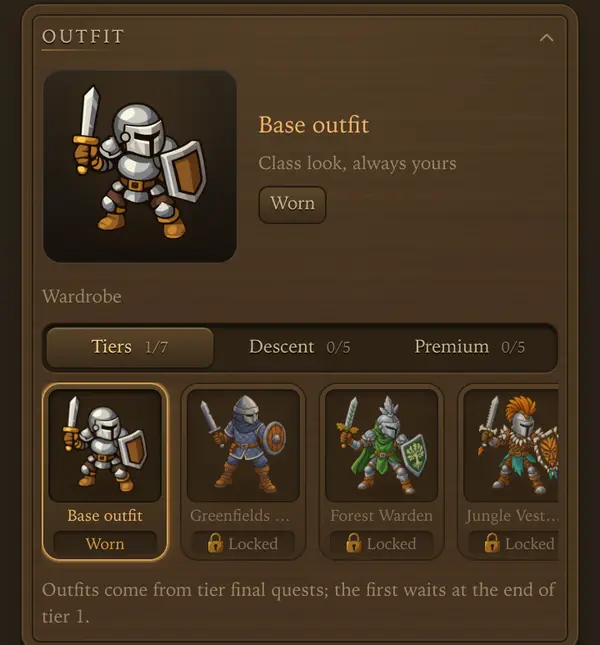 123
123
- 1The outfit you wear.
- 2Outfit groups: tiers, Descent and Premium.
- 3A locked outfit. Tap it to see where it comes from.
Wearing one
- Character, Hero, Outfit, Wardrobe. Tap an owned outfit to wear it.
- The wardrobe has three shelves: Tiers, Descent and Premium. A locked tile tells you where it comes from.
Where they come from
- Tier outfits: the final quest of each land. They belong to the character that earned them.
- Descent outfits: 1000 Descent Tokens each in the dungeon token shop, after level x5 of that dungeon.
- Gem outfits: 500 gems each, unlocked for every character on the account.
- Premium has its own outfit, worn while premium runs.
- Outfit dye from the Descent token shop changes the cloth color of tier outfits.
Tips
- Everyone starts with the base outfit of their class.
Nameplates
A nameplate changes how your name looks to everyone. It never changes a number in a fight.
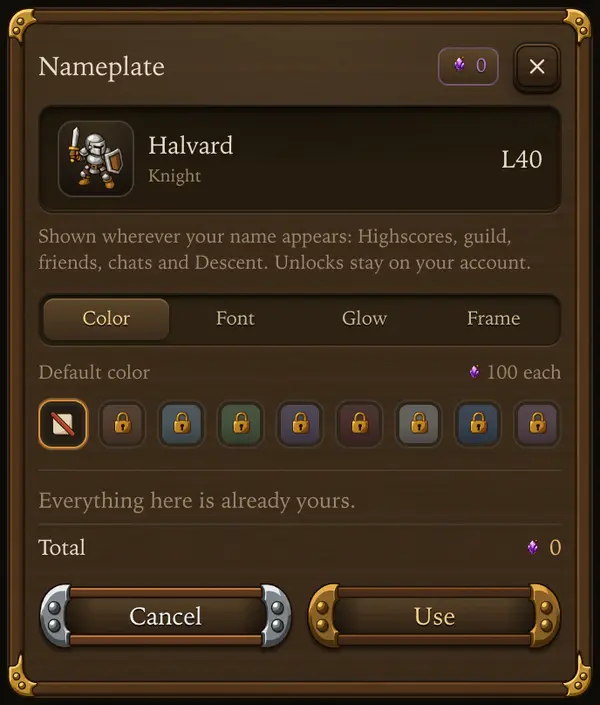 123
123
- 1Your name as others see it.
- 2Color, font, glow or frame.
- 3Buy what is new, or use what you own.
Picking one
- Character, Hero, Outfit, Nameplate. The row shows your name the way others see it.
- Four parts: 8 colors, 5 fonts, animated glows and a frame around your portrait. The preview at the top changes as you tap.
- Your name wears it everywhere it appears: Highscores, guild, friends, chats, World Boss standings and Descent. The frame goes wherever your portrait is shown.
Prices
- Color 100 gems, font 200 gems, or both together for 250.
- A glow is 500 gems. Royal flame comes with Premium; Warbanner is earned with the Unbroken title.
- Frames: two basic ones are free, each tier's final quest gives a tier frame, and premium frames are 300 gems (animated ones 500).
- Anything you buy stays on your account. Switch between owned looks for free.
Tips
- Royal flame goes dark on your name when Premium ends, and comes back when you renew.
Spell mastery
Late-game upgrades for each attack spell.
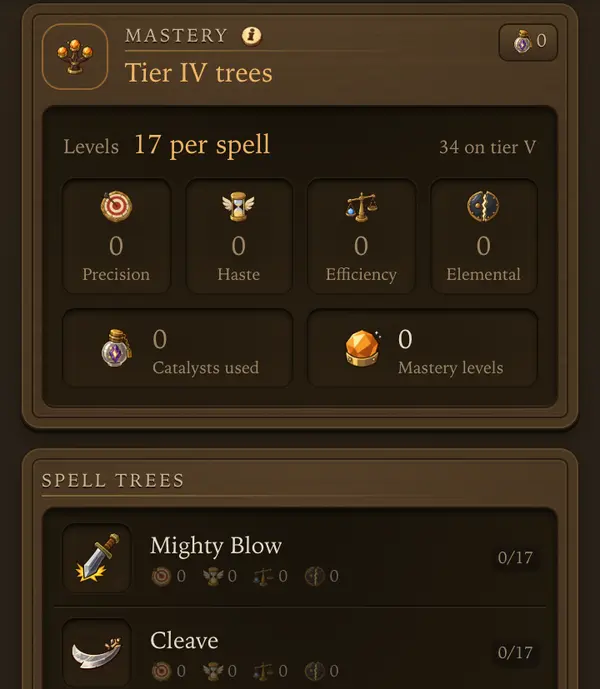 12
12
- 1How many levels each spell tree takes.
- 2A spell tree. Tap it to spend levels.
The tree
- Every attack spell has four branches: Precision (crit chance), Haste (shorter cooldown), Efficiency (lower mana cost) and Elemental (lower target resist, or armor for physical spells).
- Each level adds 1%, up to 25. A knot lights up every 5th level.
Costs
- A level costs gold and the matching catalyst. Catalysts drop on hunts in the later lands and cannot be traded.
- Elemental costs neither gold nor catalysts.
- Reset returns half of what a branch cost.
Tips
- Put mastery into the spells your rotation casts most.
Every number behind it: Spell mastery
Nothing here matches that.
 Town
Town
Shop and selling
The NPC shop sells supplies and buys anything at a floor price.
1234
- 1Buy potions, food and runes here.
- 2Free weight left in the bag.
- 3Sell all loot to the NPC in one tap.
- 4Bag weight: used and max.
Buying
- Shelves: health potions, mana potions, food, bolts (paladin), runes and blessings. Tap Buy on a row.
- The gear icon at the top hides shelves you do not use.
Selling
- Sell to NPC opens a list of your bag. Tick what goes and confirm.
- The NPC pays the price floor. Players on the Market often pay more for good items.
- Cooked dishes and bound items cannot be sold to the NPC.
- You cannot sell while the character is hunting.
Tips
- Check the Market price of rare drops before you sell them to the NPC.
Every number behind it: Economy and fair play
Depot
Storage in town. Nothing in the depot goes on a hunt.
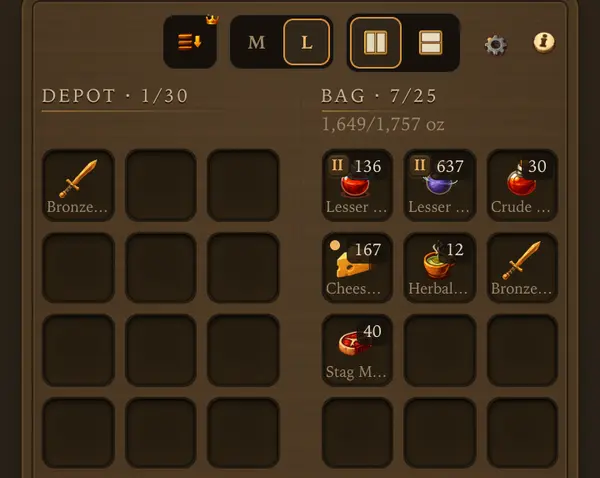 12
12
- 1Depot: storage in town.
- 2Bag: what goes on the next trip.
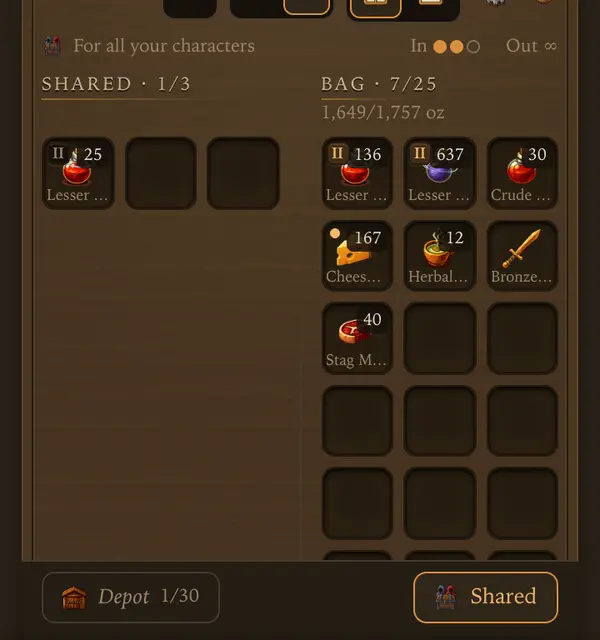 123
123
- 1Shared: one storage for all your characters.
- 2In: moves left today, for the whole account. Out: always free.
- 3Shared Depot: tap a square to take it out.
How it works
- The depot opens after your first hunt.
- Each depot tab holds 30 slots. More tabs and slots come with premium or gems.
- Stash a piece from its bag sheet, or move items between bag and depot on the Depot screen.
- Market purchases land in your depot.
Shared Depot
- Tap Shared next to your depot tabs: one storage for all characters on your account. Your own depot stays as it is.
- Tap a bag square to put it in. Tap a Shared Depot square to take it into this character’s bag. What does not fit stays in its depot.
- Gear keeps its stars and rarity. Gold and bound items stay with the character.
- Free accounts get 3 slots and 3 moves a day for the whole account, not per character. New moves come at 00:00 UTC.
- Only putting in uses a move - one per put-in, even onto a stack that is already there. Taking out is always free, on any character.
- So moving an item from one character to another costs 1 move: put it in on the first, take it out on the second.
- The dots above the grid show the moves left today.
- Premium on any of your characters opens 30 slots with no daily limit for the whole account.
- When premium ends nothing is lost: you can still take everything out.
Tips
- Before a hunt, move everything the trip does not need out of the bag: free weight is loot you bring home.
- With premium, Stash loot sends a hunt’s haul straight to the depot.
Every number behind it: Economy and fair play
Market
Buy from and sell to other players.
Buying
- One market for the whole world. Browse lists what players sell. Tap an item to see the offers and buy.
- What you buy lands in your depot, whatever it weighs. Keep a free depot square.
Selling
- Sell lists your goods at your price for a time you choose. Offers stay up while you are away.
- Listing costs 1% up front, kept even if nothing sells. A sale takes 3% commission. The listing sheet shows exactly what you bank.
- You have 3 offer slots, 20 with premium. Pull takes an offer down and the goods go back to your depot. Expired offers come back too.
Tips
- Look at what others ask before you list: a price far above the rest just sits there.
Every number behind it: Economy and fair play
Forge
Turn spare copies of an item into a better one.
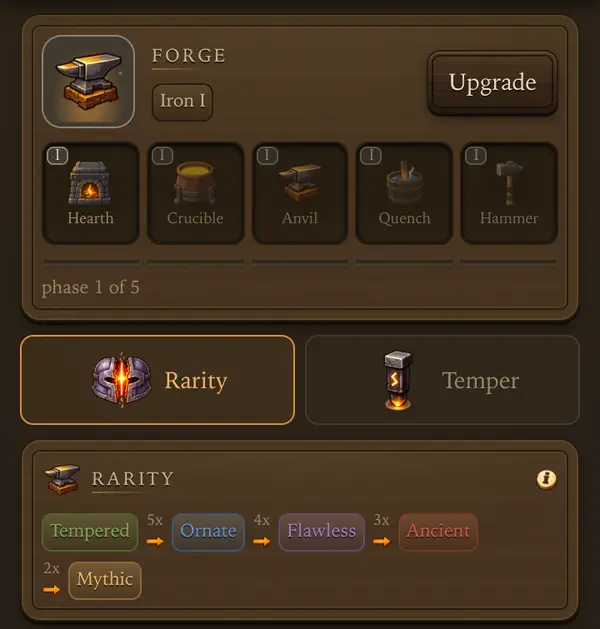 1234
1234
- 1Upgrade builds the next part of your forge level.
- 2The five parts of the current forge level.
- 3The Rarity tab: fusion.
- 4The rarity ladder and how many copies each step takes.
Fusion
- Copies of one item make one piece a rarity higher.
- A fusion costs gold and dust, and it can fail. Copies, gold and dust are spent either way.
- Every failure raises the chance of the next attempt. The card shows which attempt is guaranteed. The count resets on success.
- Copies count from the bag and the depot. Worn pieces and pieces with an active imbue do not. While you hunt, only the depot counts.
Forge levels
- Each forge level has five parts, each with a price and a build time.
- Parts 1 to 3 bring guaranteed fusions sooner. Parts 4 and 5 widen the temper range.
- Tap the (i) on the Forge screen for the full level table.
Tips
- Disenchant gear you will never wear or fuse: it gives the dust the Forge needs.
Every number behind it: Rarity, forge, imbues
Temper
Roll a bonus onto a gear slot.
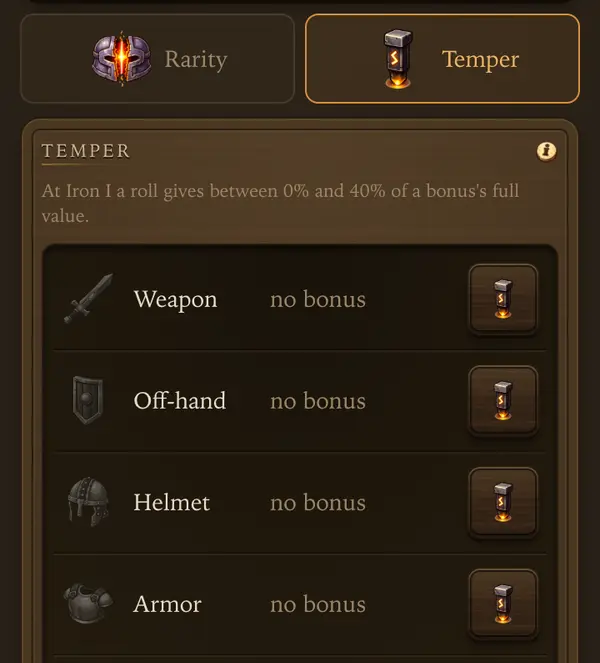 12
12
- 1The Temper tab of the Forge.
- 2Tap the button on the right to roll a bonus on that piece.
Rolling
- A roll costs gold and one dust. It never fails: you keep either the new bonus or the old one.
- Forge level limits how high a bonus can roll. Full values need the last forge levels.
- The whole set shares one power budget. A roll above it keeps the old bonus.
The bonus belongs to the slot
- It stays when you swap gear and scales with the new piece. An empty slot gives nothing.
- Mage and paladin carry no off-hand, so they get a second weapon row instead: Weapon II.
- It works on hunts, dungeons, raids and the boss. A roll made during a trip applies from the next one.
- Tap the (i) on the Temper screen for every bonus and its range.
Tips
- Temper the slots you will keep filled, not the piece: an upgrade later keeps the bonus.
Every number behind it: Rarity, forge, imbues
Stars
Take a Mythic (gold) item past gold.
How it works
- Merge a gold piece with any plain gold piece of the same tier for one star, up to 3.
- It never fails. Each star needs a higher forge level.
- The starred piece keeps its imbues.
Tips
- Use a gold piece you do not wear as the material, not one you rely on.
Every number behind it: Rarity, forge, imbues
Crafting and professions
Make potions, food, sigils, runes and scrolls from materials your hunts bring home.
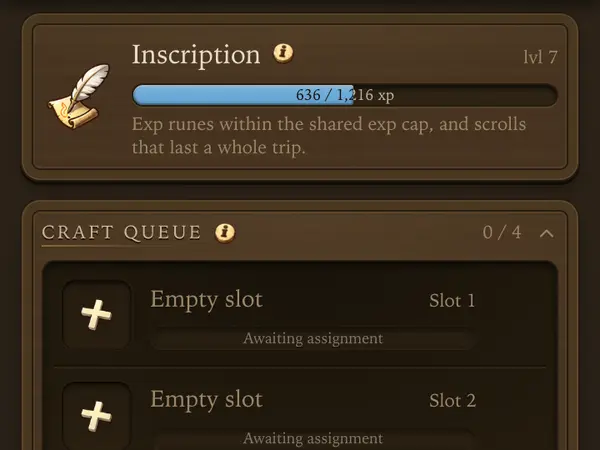 12
12
- 1Your profession and its level.
- 2A craft slot: put a recipe in it.
Professions
- Alchemy: potions and combat elixirs. Inscription: exp runes and scrolls. Enchanting: imbues and disenchanting. Cooking: better food.
- Each character takes 2 professions, each up to level 30. Dropping one resets it to zero and costs gold (2,500 at level 1).
- For other professions, use another character or the Market.
The craft queue
- The queue holds 4 jobs. It costs only time and keeps running while you hunt.
- Cancelling a waiting job returns its materials. Cancelling the job in progress loses them.
- Crafting something yourself is cheaper than buying it. The item works the same for everyone.
Disenchanting
- Convert on the Disenchant list breaks one piece into dust and a chance of shards. Worn and imbued pieces stay.
- On a trip only depot pieces can be disenchanted; bag pieces wait for your return.
- With premium, Disenchant All breaks every Tempered and Ornate piece in one tap. Flawless and up always go one at a time.
Tips
- Fill the queue before a long hunt: it works while you are away.
- Pick a profession that makes what your hunts burn, like potions or food.
Every number behind it: Professions
Quests and daily rewards
Goals that pay gold, gems and gear for playing.
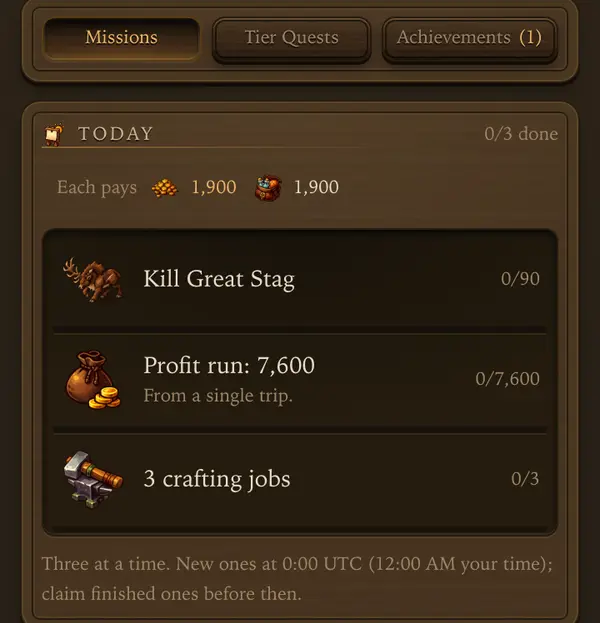 123
123
- 1Missions, tier quests and achievements.
- 2A mission and its progress.
- 3When new missions arrive.
Quests
- Town, Quests has three drawers: Missions, Tier Quests and Achievements.
- Missions: three Today missions, new at 0:00 UTC, and This week missions that reset on Monday at 0:00 UTC. Tap Claim when one is done.
- Tier Quests lead you through each land. The final quest of a land gives its outfit.
Daily chest and calendar
- Hall, Inbox has the daily chest. Open it every day: day 7 of each week pays gems, and every 28th day pays a bigger chest.
- The monthly calendar lets you claim only today, so open it daily. The last chest needs every earlier day claimed.
Tips
- Today missions are quick wins: check them before you set out.
Every number behind it: Quests, marks, titles
Nothing here matches that.
 With others
Guilds
Play with others for shared perks, a weekly raid and guild wars.
Joining
- Without a guild you see invites, a list of guilds with Apply, and Found a guild.
- Your first guild is free. Each new guild you found after that costs 100 gems.
- You have one application open at a time. Withdraw it under Your application to apply somewhere else.
- A guild with Auto-accept shows Join instead of Apply: you are in right away while it has room. The leader turns it on in Manage.
- After you leave a guild or get kicked, you wait 12 h before joining another one. Founding your own guild is always open.
- A guild holds up to 30 members: a Leader, Vice-Leaders and Members. The leader and vice-leaders can invite by name. In Manage the leader picks what vice-leaders may also do: applications, kicks, member slots and the crest.
Goals and perks
- Goals shows the guild level and its perks. The leader picks one perk at each guild level: more exp, loot, cheaper supplies, profession exp or strength against elites and bosses.
- This week shows two weekly goals for the whole guild. Reaching them gives everyone extra loot chance and exp.
Tips
- Last active in the member list shows who still plays.
Every number behind it: Guilds
Guild raid
A weekly boss the whole guild fights together.
How it works
- Every Monday at 0:00 UTC the guild starts again at boss level I. The whole guild shares one health pool, and each boss that falls opens a tougher one.
- The boss has three phases, each with its own element.
- Each member gets one attempt a day, up to 10 minutes. A raid is all-out: every potion sip uses 2 bottles, and food and bolts go 2x as fast. The first empty supply ends the attempt.
- An attempt gives no exp or loot, and dying ends it without a penalty.
- Attack asks to confirm and shows your gear, supplies and rotation. Gear and skills stay locked until the attempt ends.
Rewards
- Your damage earns tickets for the raid chest: scrolls and Ancient or Mythic gear.
- Raid scrolls work only in Descent and guild sieges.
Tips
- Bring the element the current phase is weak to.
Every number behind it: Raid and world bosses
Guild war
Six days against one rival guild, each day scored on a different activity.
How it works
- The leader signs the guild up with Join the Guild War. A guild needs at least 10 members.
- Each day from Monday to Saturday scores one thing. Days change at 0:00 UTC.
- The guild with more points takes the day and its worth. All days together are worth 11, so 6 wins the war. A tied day splits its worth.
- A hunt, run or crafting job scores on the day it ends, not the day it starts.
- War effort shows what you added. War rewards shows what the guild wins.
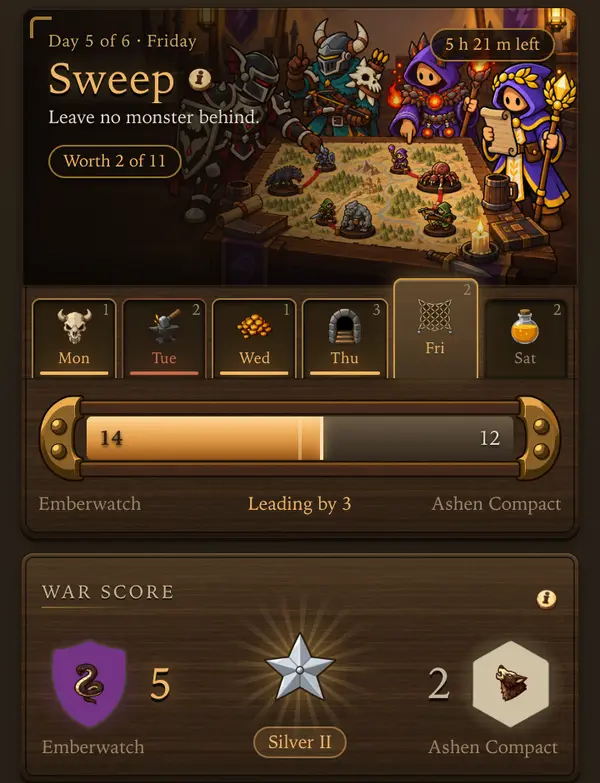 1234
1234
- 1Today's day. Tap it for the rules, today's score and who scored.
- 2The six days and what each is worth. Won days glow, the open one is raised.
- 3Today's points: your guild on the left, the rival on the right.
- 4Days won so far. The guild that reaches 6 wins the war.
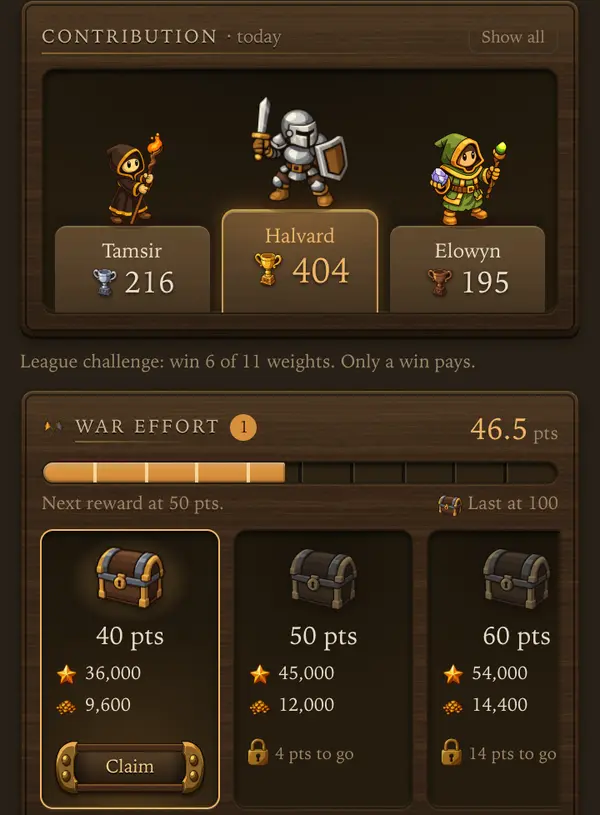 1234
1234
- 1Today's top members.
- 2Show all lists the whole guild, zeros too.
- 3Your own effort this war. Each mark is a reward step.
- 4Claim a reached step right away, even mid-war.
Monday: Hunting (worth 1)
- On Sunday, restock potions and food so you can leave right after 0:00 UTC.
- Open Adventure, Hunt and pick a monster in a land of your own tier. Hunts below your tier score nothing today.
- Pick the monster you kill fastest, not the one that pays best. Every kill is a point. Kills in the Journal show your fastest spot.
- Set Hunt for so the trip comes home on Monday. A trip that ends after midnight scores for Tuesday, and Tuesday counts no kills.
- Come back, restock and go again. A hunt that ends in death still counts its kills.
A level 40 knight (tier 2) hunts Thunder Moth for 4 h. The trip comes home at 22:00 UTC on Monday with 840 kills: the guild gets 840 points.
The same trip started at 22:00 UTC comes home on Tuesday and scores 0.
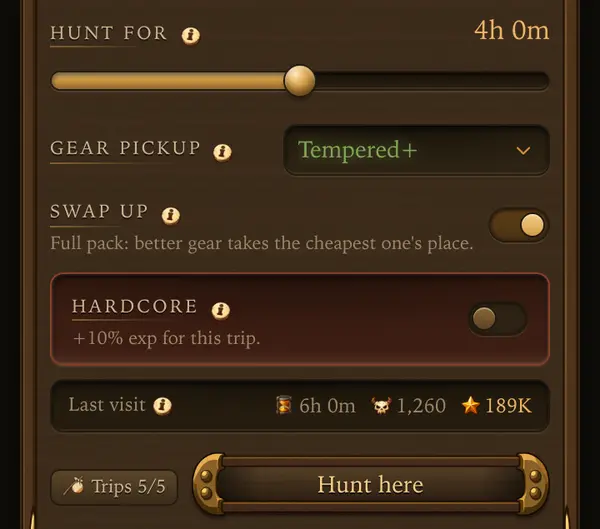 12
12
- 1Hunt for: pick hours so the trip comes home before 0:00 UTC.
- 2Hunt here starts it.
Tuesday: Forge (worth 2)
- During the week, keep spare copies of gear from your own tier in the depot and save dust. Do not disenchant them before Tuesday.
- On Tuesday, open Town, Forge.
- Fuse copies of items close to your level: your own tier, and from tier 3 also one tier below. Older items fuse fine but score nothing.
- Every attempt counts, also a failed one. A higher rarity scores more: Ornate 1, Flawless 2, Ancient 4 and Mythic 10.
- Temper rolls do not count, so leave tempering for another day.
Two fusions into Flawless and one into Ancient make 8 points, even if one of them fails.
A level 60 character fusing a level 5 item scores 0: it is two tiers below.
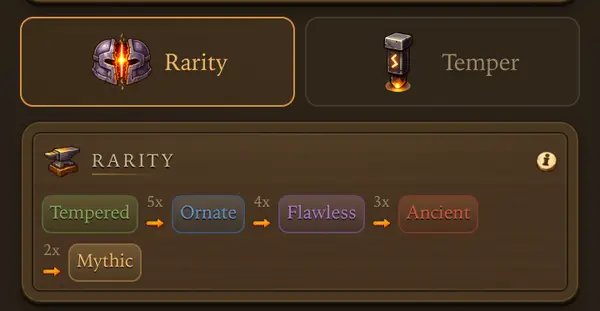 12
12
- 1Rarity is the fusion tab.
- 2Each rarity step. The higher the step, the more points one attempt makes.
Wednesday: Gold (worth 1)
- Pick a monster with high gold per kill on its card that you also kill fast: coins are gold per kill times kills. Any land counts today, your tier or not.
- Only the coins a hunt brings home count. Loot you sell later does not, so a spot with rich loot but few coins is a bad pick.
- Set Hunt for so the trip comes home on Wednesday, then go again.
Monster A drops about 30 gold per kill and you kill 400 in 2 h: 12,000 coins. Monster B drops about 90, but you kill only 100: 9,000 coins. Pick A.
A hunt brings home 40,000 coins and loot worth 30,000. Only the 40,000 coins count.
 1
1
- 1Gold per kill. Multiply it by how many you kill in an hour.
Thursday: Descent (worth 3)
- Before Thursday, agree on a time in guild chat. On Adventure, Descent tap Make party and invite guild members.
- Pick the dungeon of your own tier. A dungeon of another tier scores nothing, and below level 26 there is no dungeon for you yet.
- Go as deep as your party can clear. A clear pays 12 points on level 1 and more on each deeper level, up to 42 on level 6.
- Use both of your 2 runs. Turning back or a wipe pays only part, by the rooms you cleared.
- Pack more potions than you think. Nothing restocks inside, and an empty bag ends the run early.
Two clears of level 3 pay 48 points. Two clears of level 1 pay only 24.
Turning back halfway through level 3 pays 6.
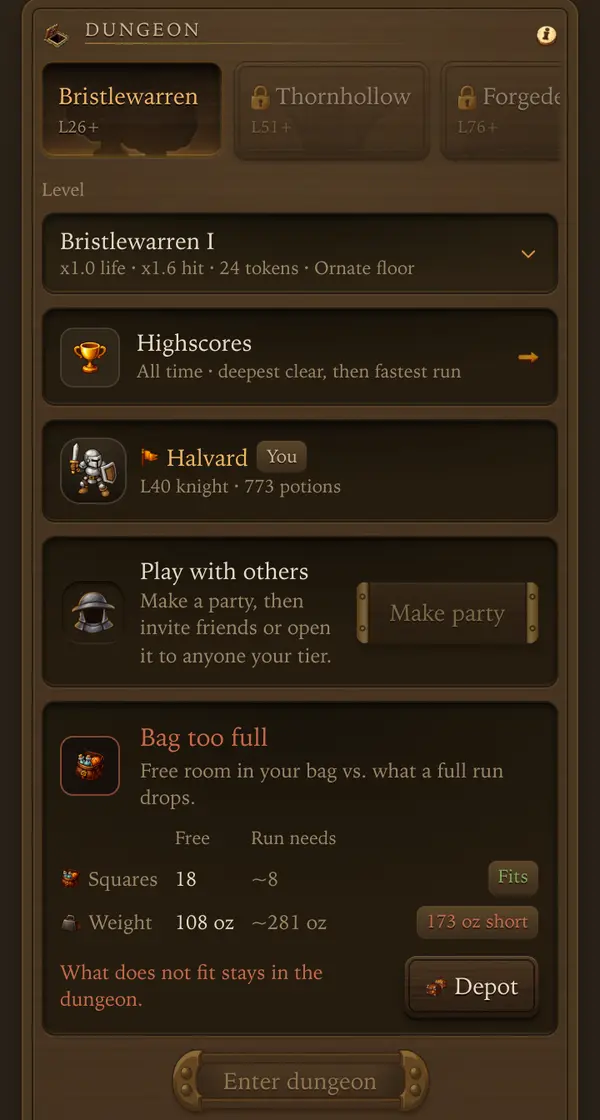 1234
1234
- 1The dungeon of your tier.
- 2How deep. Deeper levels pay more points.
- 3Make party opens a lobby to invite guild members.
- 4Enter dungeon starts the run.
Friday: Sweep (worth 2)
- On Friday, open Guild, War and unfold the Sweep board. It lists every monster of each tier with the guild kills. The lowest one is marked red.
- In guild chat, split the monsters of your tier, so every monster has someone hunting it. Elites do not count.
- Hunt the marked monster first. Each kill on it raises the score. Kills on the others add nothing until they become the lowest.
- Between trips, check the board again and switch to the new lowest monster.
- Hunt on your own tier only. Kills on other tiers do not count for anyone.
Tier 2 has 10 monsters. Your guild killed Grave Shade 188 times, but Frost Owl only 14 times.
Tier 2 scores 14 × 1.03 = 14 points. All the extra Grave Shade kills add nothing.
Frost Owl is the bottleneck: every member who hunts it now raises the score. Hunting more Grave Shade does not.
If nobody hunted Frost Owl at all, tier 2 would score 0.
Each tier has its own multiplier, so a full sweep is worth about the same hours on every tier.
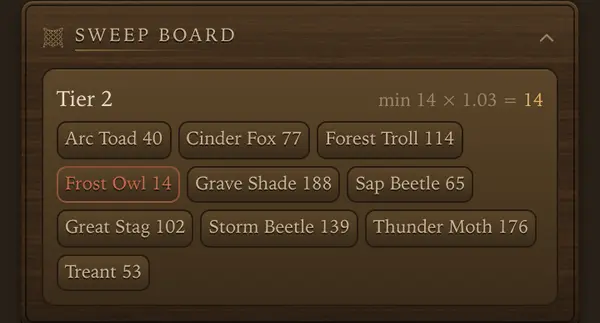 123
123
- 1One card per tier, with every monster and the guild kills.
- 2The tier score: the lowest kill count times the tier multiplier.
- 3The lowest monster is marked. Hunt it to raise the score.
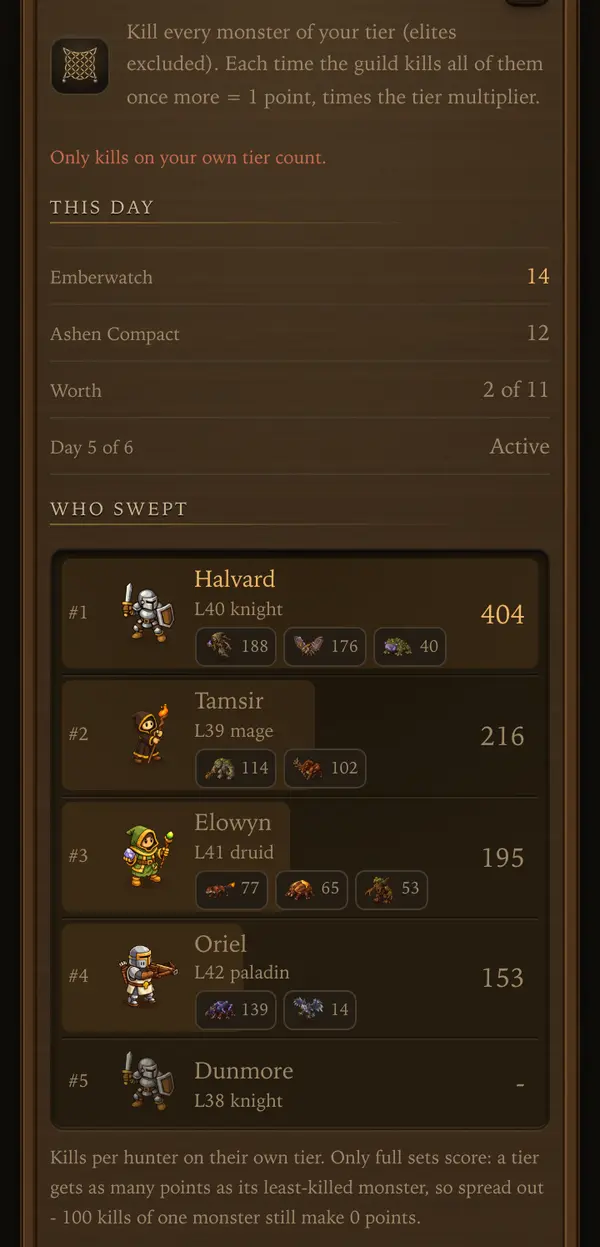 123
123
- 1Only kills on your own tier count.
- 2Today's score for both sides and what the day is worth.
- 3Every member with kills per monster. Spread out over the monsters nobody hunts.
Sweep: multiplier per tier
- The multiplier is how long one kill of every monster takes on that tier, compared with tier 1. It comes from measured kill speeds, with the best class on each monster.
- A tier with more monsters, or tougher ones, needs more hunting for the same lowest count. The multiplier pays those hours back, so an hour of guild hunting is worth the same on every tier and a guild on an easy tier does not win Friday by default.
- Tier 4 has the highest multiplier: 18 monsters at about 15 s per kill. Fewer or faster monsters mean a lower multiplier.
- Tier 1: × 1.00. 12 monsters, about 9 s per kill, one of each takes 1.8 min.
- Tier 2: × 1.03. 10 monsters, about 11 s per kill, one of each takes 1.8 min.
- Tier 3: × 2.04. 18 monsters, about 12 s per kill, one of each takes 3.7 min.
- Tier 4: × 2.54. 18 monsters, about 15 s per kill, one of each takes 4.5 min.
- Tier 5: × 1.83. 13 monsters, about 15 s per kill, one of each takes 3.3 min.
- Tier 6: × 1.27. 10 monsters, about 14 s per kill, one of each takes 2.3 min.
Two guilds both get the lowest count to 20. On tier 1 that scores 20 points, on tier 4 it scores 51: the tier 4 guild hunted about 2.5 times as long to get there.
Saturday: Crafting (worth 2)
- On Friday, gather materials for long jobs in the professions you have.
- Time the queue so jobs finish on Saturday. A job counts on the day it finishes, so one that ends on Friday night scores nothing.
- Keep the queue running all Saturday and refill it before it empties. Each hour of work pays 4 points, and higher ranks a little more.
- Collecting can wait: a finished job already counts.
A 3 h job at rank 1 that finishes on Saturday pays 12 points.
A queue kept running 20 hours of Saturday pays about 80 points. A job that finished at 23:30 on Friday pays 0.
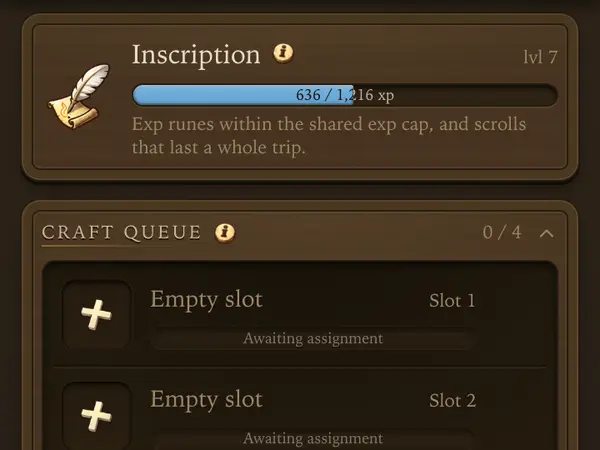 12
12
- 1Your profession.
- 2The queue. Refill it before it runs empty.
Sunday: Payday
- Sunday has no scoring. The war is settled.
- Open Guild, War and tap Claim within 3 days. You need some war effort of your own to collect.
- The winner gets the full reward with gems. A loss or a tie pays a third, without gems.
- Claim reached War effort steps too. They do not wait for Sunday.
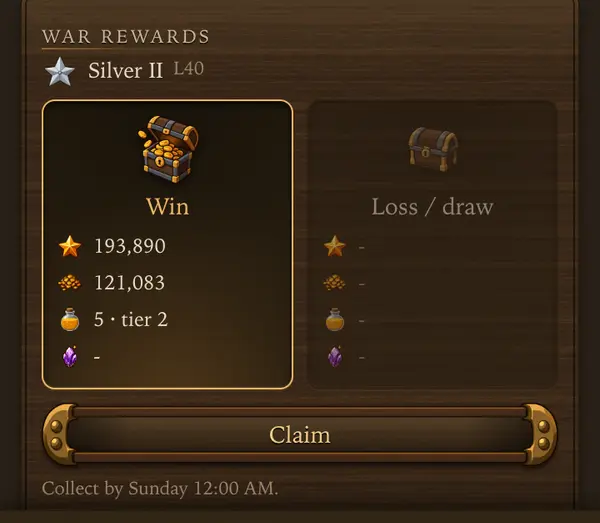 12
12
- 1What a win pays at your level. A loss or a tie pays the other card.
- 2Claim takes your reward. Collect by shows the last day.
Tips
- Check today’s day on the War screen and play into it.
- Plan one day ahead: the next day often needs things you gather today.
- Time long hunts and crafting jobs so they end on the day they should score.
- Leaving the guild forfeits its war rewards.
Every number behind it: Guilds
Descent
A dungeon run: rooms, a boss, tokens and loot you won't find outside.
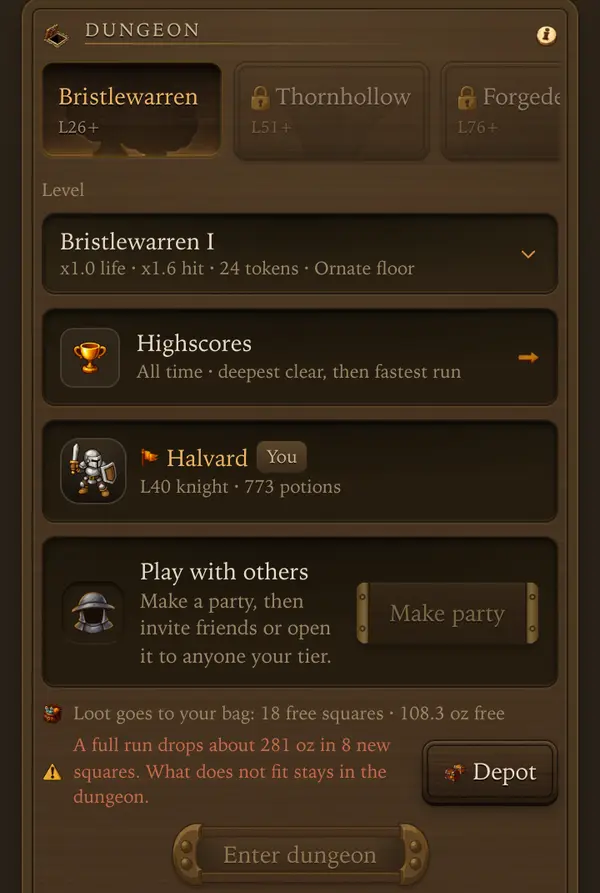 1234
1234
- 1Pick a dungeon. Each opens at its own level.
- 2Pick how deep: life, hit, tokens and the loot floor of that level.
- 3Make party to play with others.
- 4Enter dungeon starts the run.
Runs
- 2 runs a day per character, reset at 0:00 UTC. The run plays out on its own.
- Each cleared level opens the next, and deeper levels pay more tokens.
- Inside there is no restocking and no depot: pack potions before you enter. Running out of supplies ends the run.
Parties
- Go solo or with up to 3 others. Monsters get tougher with each extra member.
- Make party opens a lobby. Inviting, roles and Ready are in the Descent party guide.
Endings and tokens
- A clear keeps all loot and pays full tokens and exp.
- Turning back keeps the loot of cleared rooms and part of the tokens. A wipe pays only part of the tokens.
- Spend Descent Tokens in the token shop: scrolls, crates, gear, chests, dyes and dungeon outfits. Tokens cannot be bought or traded.
Tips
- Pack more potions than you think: nothing restocks inside.
- Clear a level solo before taking a party deeper.
Every number behind it: The Descent
Descent party
Go into Descent with up to 3 other players.
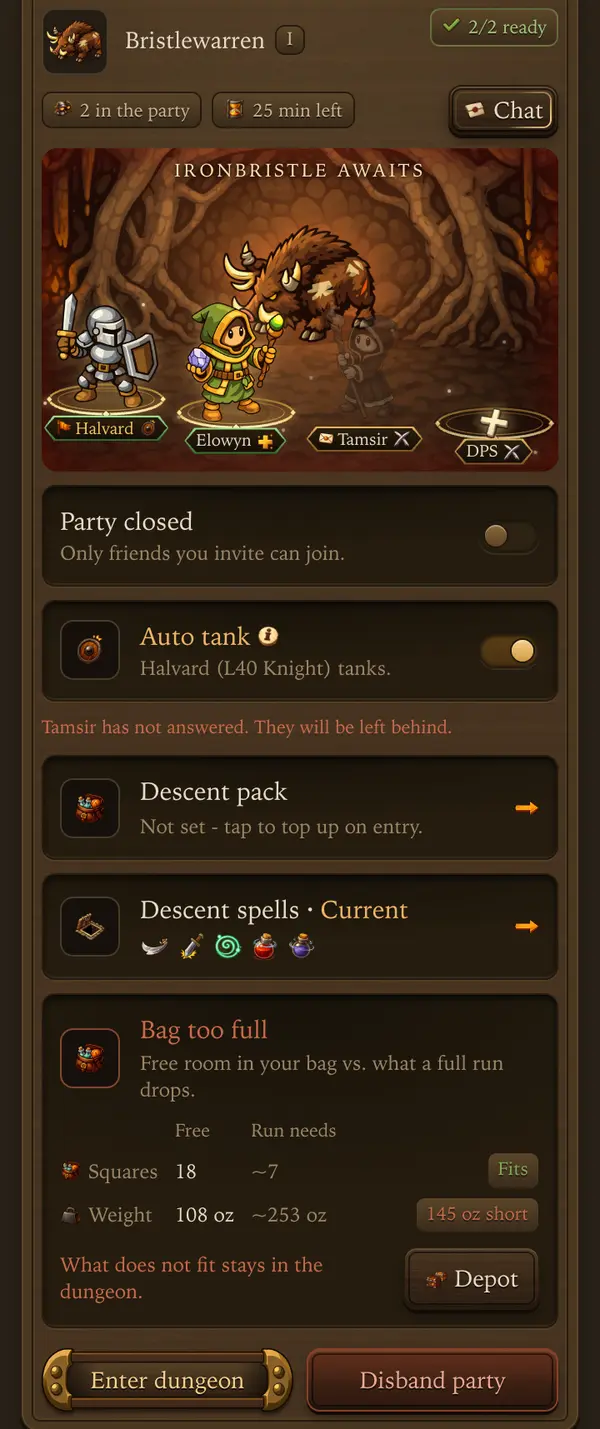 1234567
- 1An open seat. Tap it to pick its role and invite someone.
- 2A member. The green plate means Ready. Tap to see their bag.
- 3Chat talks to the whole party.
- 4Party open lets anyone of your tier join.
- 5Descent Pack: what is bought with gold when the party enters.
- 6Descent spells: the spells and potions you take in.
- 7Enter dungeon once everyone is Ready.
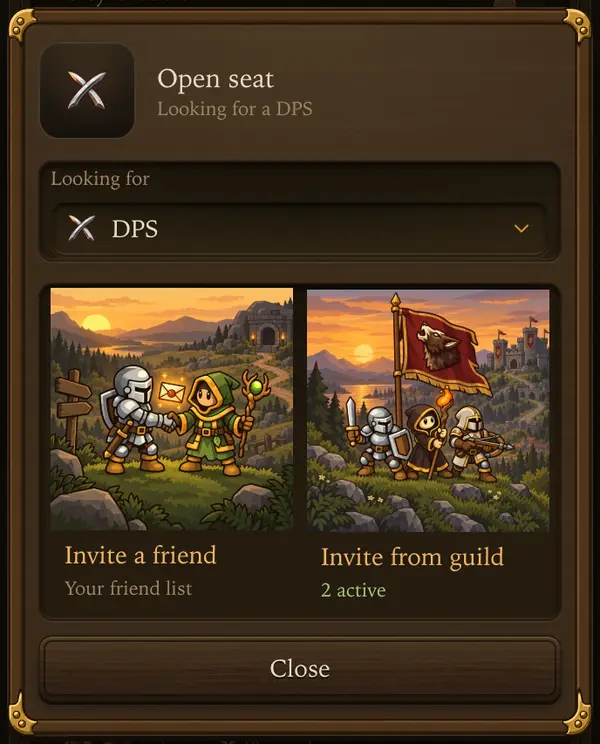 12
12
- 1Someone from your friend list.
- 2A member of your guild, friend or not.
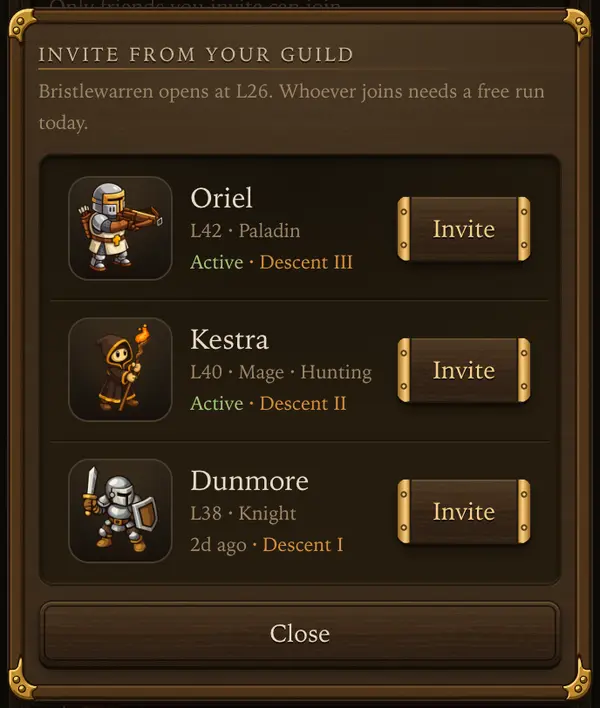 12
12
- 1Active now and the deepest level they cleared here.
- 2Invite sends them the seat.
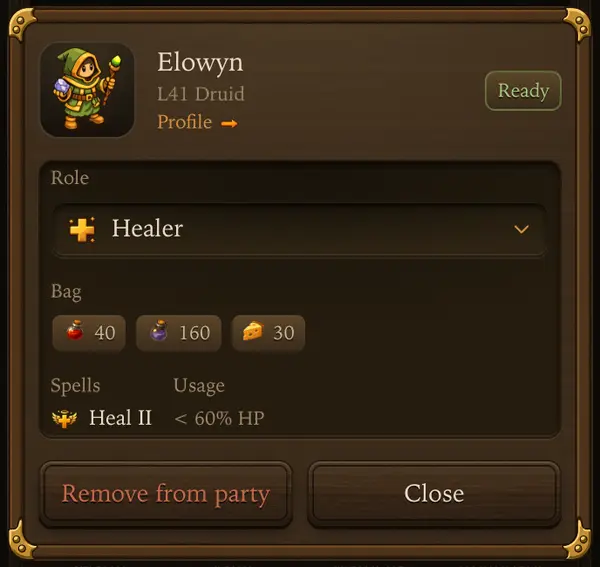 1234
1234
- 1Profile opens their player card.
- 2The leader sets their role.
- 3Potions and food they packed.
- 4Their spells, shown once they are Ready.
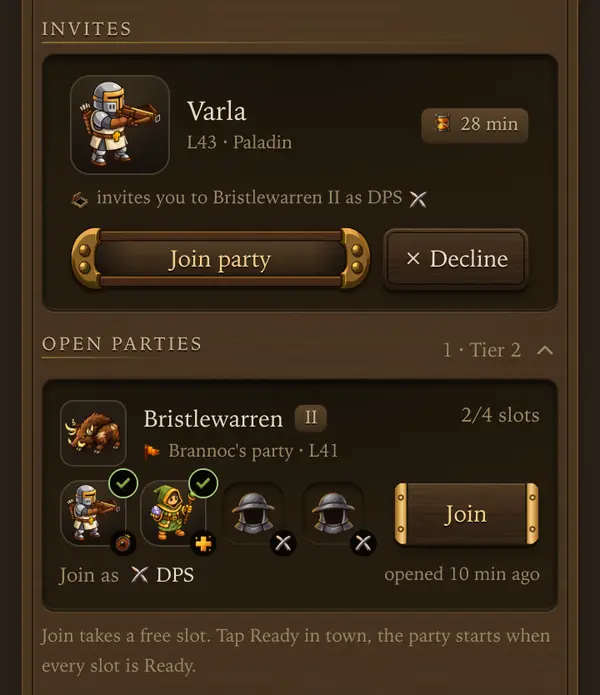 123
123
- 1An invite to you. Join party or Decline.
- 2Who the open party still needs.
- 3Join takes a free seat at once.
Making a party
- Pick a dungeon and how deep, then tap Make party. You lead the party.
- Tap an open seat and pick Invite a friend or Invite from guild. The guild list shows who is Active and how deep they have gone.
- Or open the party: anyone of your tier can then find it under Open parties and Join.
- Each member taps Ready. Then the leader enters the dungeon.
Roles and seats
- Roles: a Knight or Paladin tanks and takes the hits, a Druid casts the highest healing spell picked in Spells on the tank every 4 s while the tank is hurt and deals 75% damage, everyone else deals damage.
- The leader taps an open seat to pick the role it is looking for. Only that role can join there.
- Auto tank is on until the leader picks a Tank. It sends to the front a Knight first, then a Paladin, then a DPS, and a healer only when nobody else is there. Two of the same: the one with the most HP; same HP: the leader first.
- Picking a Tank by hand turns Auto tank off. Turning it back on picks again. If the tank falls, the run ends for everyone. Without a healer nobody is healed inside.
Joining
- Invites to other parties show under Invites on the Descent screen.
- Open parties lists open rooms of your tier with a free role for your class. Pick your role and Join.
- You can make, join or accept a party while on a hunt, and tap Ready from there. When the party enters, your hunt ends with its usual report and its loot goes to the depot.
In the lobby
- Tap a member to see their bag and active imbues and elixirs. Their spells show once they tap Ready. Profile opens their player card.
- Chat opens the party chat. It closes when the Descent ends.
- The leader can cancel an invite or remove a member. Anyone can Leave party.
- Members who have not answered an invite are left behind when the leader enters.
- An open party stays up for 1, 2 or 4 h. When time runs out it goes in with whoever is Ready, or closes, as the leader picks.
- If you lead a party, starting a hunt or entering alone asks to close the party first.
- Descent Pack buys potions, food and free oz with gold when the party enters. Cheese and Herbal Tea are bought, cooked food comes from your depot.
- Descent spells shows the spells, heals and potions you take in. Pick Descent, one of your presets or Current (your hunt spells). Change it, then tap Ready again.
- With premium, Back to the hunt (in Descent Pack) sends you back to the same hunt when the run ends. With Stash loot on, everything in your bag, Descent loot too, goes to the depot first.
- A party run ends together for everyone.
Tips
- Take a tank and a healer before going deep.
- Check the bags of your party before Ready: nothing restocks inside.
World Boss
A weekly boss fought by everyone, ranked within your class.
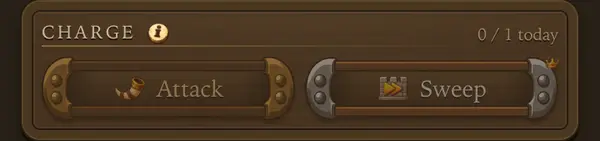 123
123
- 1Attack plays your charge out. Free.
- 2Sweep repeats your best charge at once. Premium.
- 3Charges left today.
Charging
- A new boss arrives every week. Your first charge puts you in a group of up to 100 players near your level.
- One charge a day, up to 10 minutes. The boss does not hit you, so you never heal, drink HP potions or eat. The rest is all-out: every mana potion sip uses 4 bottles, and bolts and runes go 4x as fast. The first empty supply ends the charge. The screen before Attack shows how long your bag lasts.
- Its weakness and resistances change every week. Physical damage is always neutral.
- Attack and Sweep ask to confirm and show your gear, supplies and rotation. Gear and skills stay locked until the charge ends.
Standings and rewards
- You are ranked by total damage within your class. Your best charge breaks ties. Standings show how many charges each player made this week.
- Top places get gems and chests at the weekly reset. Gems are halved if the boss survives.
- Rewards need a free bag slot for chests and a free depot slot for gear.
Tips
- Use the boss’s weakness of the week: it changes every Monday.
Every number behind it: Raid and world bosses
Rankings
See how you stand against everyone else.
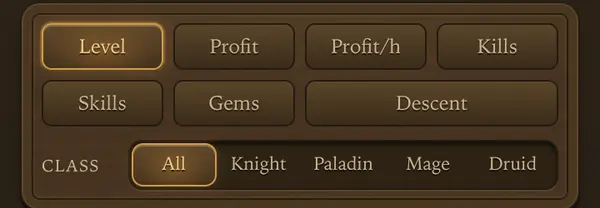 12
12
- 1Pick a board.
- 2Filter by class.
Boards
- Hall, Ranks has boards for Level, Profit, Profit/h, Kills, Skills, Gems and Descent. Filter by class, and by land on Profit/h.
- Gems ranks this month and last month. The top places get cosmetic rewards.
- Descent ranks the deepest clear, then the fastest.
- Tap a player to see their profile.
Nothing here matches that.